 United States

Vape Battery Contacts Corroded? What Discoloration and Damage Mean
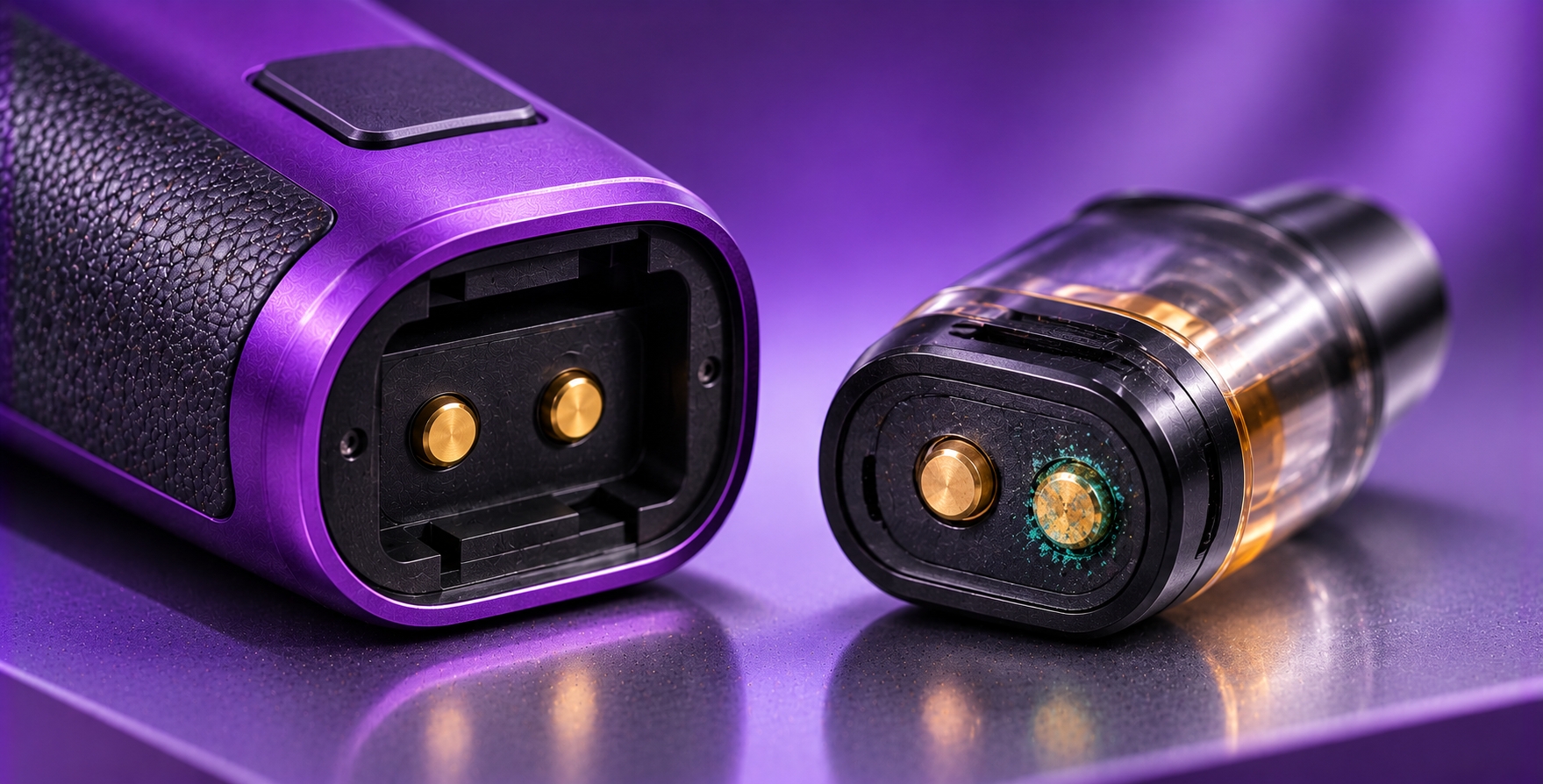
Battery contacts are small conductive surfaces that help transfer electrical power between a battery and compatible vape hardware. Depending on the device, these contacts may be located inside a removable-battery compartment, beneath a pod, or within a sealed electronic assembly.
If a contact develops unusual discoloration, rough deposits, or visible deterioration, it can be difficult to tell whether the surface is simply dirty or affected by corrosion. Not every dark spot indicates damage, but changes accompanied by moisture exposure, pitting, or unreliable electrical operation deserve attention.
This guide explains what corroded vape battery contacts may look like, why deterioration can occur, and how to recognize situations that require replacement or manufacturer support instead of ordinary cleaning.
Quick Verdict: Discolored vape battery contacts are not automatically corroded. Dust, e-liquid residue, surface finishes, and normal material differences can affect their appearance. However, crusty deposits, pitting, flaking, or discoloration following liquid exposure may indicate deterioration. If a removable battery itself shows corrosion, leakage, swelling, or other physical damage, stop using it. Do not scrape contacts, apply chemicals, or attempt repairs inside a sealed battery compartment.
Where Are Vape Battery Contacts Located?
The term "battery contacts" can refer to several different electrical interfaces. Identifying which component is affected is important because not every contact is designed for user maintenance.
Removable-Battery Terminals
Some vape mods use removable lithium-ion cells. The battery terminals connect with conductive contacts inside the battery compartment. These may include fixed or spring-loaded contact surfaces, depending on the design.
The battery's own positive and negative terminals should be distinguished from the contacts built into the device. Damage to either can require different replacement or service decisions.
Pod and Cartridge Contacts
Pod systems commonly use exposed contact pads or small connector pins to establish an electrical connection between the cartridge and device. These are not necessarily direct battery terminals, even though they form part of the device's electrical system.
Moisture and residue around this interface can contribute to intermittent recognition. Puffin's pod connection guide covers those recognition symptoms separately.
Sealed Internal Battery Connections
Devices with integrated batteries contain internal electrical connections that are not intended for routine user access. These components should not be exposed by opening the housing to investigate suspected corrosion.
If a sealed device shows signs of internal liquid damage or electrical deterioration, follow the manufacturer's service or replacement instructions.
What Does Corrosion on Vape Battery Contacts Look Like?
Corrosion is a form of material deterioration involving chemical or electrochemical reactions. Its appearance varies with the metal, surface coating, contaminants, and environmental conditions.
Possible visual indicators include:
- Unusual powdery or crust-like deposits.
- Greenish, whitish, or brown discoloration on certain metal surfaces.
- Pitting or rough areas where the surface was previously smooth.
- Flaking or deterioration of a conductive coating.
- Visible changes following water or liquid exposure.
Color alone is not a reliable diagnosis. Some electrical contacts have darker finishes or naturally different metallic tones. E-liquid residue, dust, and staining can also resemble corrosion.
Do not scrape or polish a contact simply because its color differs from another device. Removing a protective surface coating can cause additional damage.
What Causes Vape Battery Contact Corrosion?
1. Moisture Exposure
Water or persistent moisture can contribute to corrosion when it reaches susceptible metal surfaces. The extent of deterioration depends on the contact material, exposure duration, and environmental conditions.
A device exposed to rain, splashes, or significant condensation may require inspection even if its exterior appears dry afterward.
2. E-Liquid Contamination
A leaking pod or tank can leave residue around accessible electrical connections. Depending on the liquid and the contact materials, contamination may interfere with electrical contact and potentially contribute to deterioration over time.
E-liquid residue should not automatically be identified as corrosion. A sticky film and a visibly pitted metal surface are different observations and may require different responses.
3. Battery Leakage or Physical Damage
A damaged lithium-ion cell may show leakage, deformation, swelling, or other abnormal conditions. Residue around a removable cell should not be assumed to be harmless dirt.
If the battery itself appears to be leaking or corroded, discontinue use and follow the battery manufacturer's safe handling and disposal instructions. Do not attempt to clean and reuse a visibly damaged cell.
4. Environmental Contaminants
Dust, salts, and other environmental contaminants can collect around exposed metal surfaces. Under certain conditions, contamination combined with moisture may contribute to deterioration.
Devices frequently exposed to damp storage areas or contaminated environments may need closer attention to their externally accessible components.
5. Damaged Contact Coatings
Some electrical contacts use surface finishes intended to support conductivity and durability. Abrasion, repeated mechanical stress, or improper cleaning may damage these finishes and expose underlying material.
A scratched or worn contact is not automatically corroded, but visible deterioration can justify manufacturer assessment, particularly when accompanied by unreliable operation.
Corrosion vs. Dirt vs. Normal Discoloration
A visual inspection can help identify concerning conditions, but it cannot always establish the exact cause of a surface change.
| Observation | Possible Explanation | Recommended Response |
|---|---|---|
| Loose dust or lint on an accessible surface | Ordinary contamination | Follow approved external cleaning instructions |
| Sticky film near a pod connection | Possible e-liquid residue | Inspect for leakage and follow the manual |
| Uniform dark or gold-colored finish | Possibly normal contact coating | Compare with manufacturer documentation |
| Crusty deposits, pitting, or flaking | Possible corrosion or surface damage | Discontinue use and seek assessment |
| Residue on a leaking or swollen battery | Potential battery failure | Do not use or charge the cell |
If the source of a deposit is uncertain, do not handle it with bare hands or attempt chemical cleaning. Seek manufacturer or qualified service guidance.
How to Inspect Vape Battery Contacts Safely
Step 1: Stop Using and Charging the Device
If corrosion or significant electrical contact damage is suspected, stop using the device. Disconnect charging equipment if it is safe to do so and switch the device off according to its instructions.
If the device is unusually hot, smoking, swelling, or emitting an abnormal odor, do not continue routine inspection. Move away and follow appropriate battery emergency guidance.
Step 2: Identify the Contact Type
Determine whether the affected surface belongs to a removable battery, an accessible pod connection, or an integrated device assembly. Do not open a sealed housing to reach internal contacts.
Step 3: Look for Visible Physical Damage
Without touching exposed electrical components unnecessarily, look for deposits, pitting, deformation, melting, or damaged insulation. Inspect the surrounding housing for signs of liquid exposure.
For removable cells, also check for torn wraps, damaged insulating rings, dents, or swelling without removing protective material.
Step 4: Follow Only Approved Maintenance Procedures
If the manufacturer identifies the issue as ordinary surface dirt and permits cleaning of accessible contacts, follow its exact procedure. A clean, dry, lint-free cloth may be appropriate for certain external surfaces, but not every component can be cleaned safely by the user.
Do not scrape deposits, bend spring-loaded pins, apply vinegar or household chemicals, or introduce cleaning liquids into the battery compartment.
Step 5: Seek Replacement or Authorized Service
If the contact is visibly corroded, pitted, melted, or structurally damaged, discontinue use of the affected hardware. A removable cell showing corrosion or leakage should not be returned to service.
For damage to a device's internal contacts, consult the manufacturer about servicing, replacement, and appropriate disposal.
Safety Warning: Never bridge battery contacts with metal objects, scrape a battery terminal, puncture a cell, or open a sealed lithium-ion battery assembly. Do not charge a device with suspected liquid intrusion or damaged electrical contacts. If the battery is swelling, overheating, leaking, smoking, or producing unusual odors, stop handling it and follow emergency safety guidance.
Can Corroded Contacts Cause Charging Problems?
Yes, deterioration at an electrical connection can interfere with current flow. Depending on the device, contact damage may contribute to intermittent power delivery, charging problems, or connection warnings.
However, a charging failure does not establish that battery contacts are corroded. Cable faults, charging-port damage, incompatible equipment, and internal electronics may produce similar symptoms.
Puffin's charging port troubleshooting guide addresses those separate connector and charging issues.
Can Corrosion Affect Battery Safety?
Corrosion or damage can affect the reliability of electrical contact, but the severity of the risk depends on the affected component and the condition of the battery or device.
The most serious concerns include damaged cell insulation, leakage, short-circuit exposure, abnormal heating, and physical battery deterioration. These conditions require more caution than ordinary dust on an accessible connector.
Puffin's battery safety guide explains why removable-cell wraps, terminal protection, compatible charging equipment, and visible battery condition matter.
Should You Clean or Replace Corroded Battery Contacts?
The decision depends on whether the surface is merely contaminated or actually deteriorating, and whether it belongs to a replaceable cell or an integrated device component.
- Ordinary dirt on accessible contacts: Follow manufacturer-approved cleaning instructions if the component is designed for user maintenance.
- Visible corrosion on a removable lithium-ion cell: Stop using the cell and follow approved replacement and disposal guidance.
- Damaged contact pins or battery-compartment terminals: Seek authorized service rather than bending or resurfacing the contacts.
- Suspected corrosion inside a sealed device: Do not open the housing. Contact the manufacturer for assessment or replacement.
- Uncertain residue or deposits: Avoid chemical cleaning and seek qualified advice before handling further.
A surface becoming shiny after cleaning does not necessarily mean that underlying damage has been corrected. Pitting, lost plating, or compromised insulation cannot be evaluated reliably through appearance alone.
How to Reduce the Risk of Battery Contact Deterioration
Preventive care should focus on limiting contamination and physical damage rather than aggressively polishing electrical components.
- Keep devices away from water and excessive moisture.
- Address leaking pods and tanks promptly.
- Follow the manufacturer's instructions for accessible contact maintenance.
- Avoid carrying loose removable cells near keys, coins, or other metal objects.
- Use protective battery cases for removable cells during transport.
- Protect battery wraps and insulating rings from damage.
- Do not force batteries into compartments or chargers.
- Inspect removable cells for visible damage before use.
No maintenance schedule guarantees that corrosion will never occur. Storage conditions, contact materials, moisture exposure, and device construction all influence deterioration.
Frequently Asked Questions
Why are my vape battery contacts turning dark?
Darkening may reflect a normal surface finish, contamination, wear, or material deterioration. Color alone does not confirm corrosion. Look for additional signs such as deposits, pitting, flaking, or changes following liquid exposure.
Can I clean corroded vape battery terminals with alcohol?
Do not apply alcohol or another cleaning liquid unless the manufacturer explicitly permits it for the specific component. A visibly corroded removable lithium-ion cell should not be cleaned for continued use. Seek replacement and disposal guidance instead.
Is green residue on a vape contact corrosion?
Greenish deposits can be associated with corrosion on certain copper-containing materials, but appearance alone cannot confirm the substance. Do not scrape or chemically treat unidentified deposits. Seek manufacturer assessment.
Can dirty battery contacts stop a vape from working?
Yes. Contamination may interfere with electrical contact, although similar symptoms can also result from incompatible components, damaged connectors, battery faults, or internal electronics.
Can I still use a battery with corrosion on its terminal?
No. A removable lithium-ion cell showing visible corrosion, leakage, swelling, or other physical damage should be taken out of service and handled according to the manufacturer's replacement and disposal instructions.
Do all vape devices have removable battery contacts?
No. Some devices use removable batteries with accessible compartment terminals, while others contain integrated batteries and sealed internal connections. User maintenance procedures differ between these designs.
Final Verdict
Discolored vape battery contacts are not always corroded. Ordinary residue, surface finishes, and minor contamination can affect appearance without proving that the underlying metal has deteriorated.
More concerning signs include crusty deposits, pitting, flaking, leakage, damaged insulation, and changes following significant moisture exposure. The correct response depends on whether the affected surface belongs to a removable battery, an accessible device connector, or a sealed internal assembly.
Avoid improvised electrical repairs and aggressive cleaning. If a battery or contact is visibly damaged, stop using the affected hardware and follow manufacturer-approved service, replacement, or disposal instructions.
Bottom Line: Discoloration is a reason to inspect, not proof of corrosion. Visible deterioration, battery leakage, damaged insulation, or unreliable electrical contacts require a more cautious response than ordinary surface dirt.
Technical References & Editorial Review
This article combines general electrical-contact deterioration principles with published lithium-ion battery safety guidance. It distinguishes observations from possible causes and does not claim laboratory testing or hands-on examination of a specific vape device.
- U.S. Food and Drug Administration — Tips to Help Avoid Vape Battery Fires or Explosions: manufacturer instructions and battery safety precautions.
- U.S. Consumer Product Safety Commission — Warning on Loose 18650 Lithium-Ion Cells: exposed-terminal and short-circuit hazards.
- U.S. Fire Administration — Battery Fire Safety: warning signs of damaged lithium-ion batteries and safe handling.
Editorial Note: Prepared for adults of legal purchasing age. This guide focuses on visible battery-contact deterioration and non-invasive inspection. It does not recommend repairing lithium-ion cells, resurfacing terminals, or opening sealed electronics. Manufacturer documentation for the exact battery and device should take precedence over general troubleshooting information.
Prepared: November 5, 2026 | Editorial Review: Pending publication approval.