 United States
Vape Screen Symbols Explained: Common Icons and Warning Messages
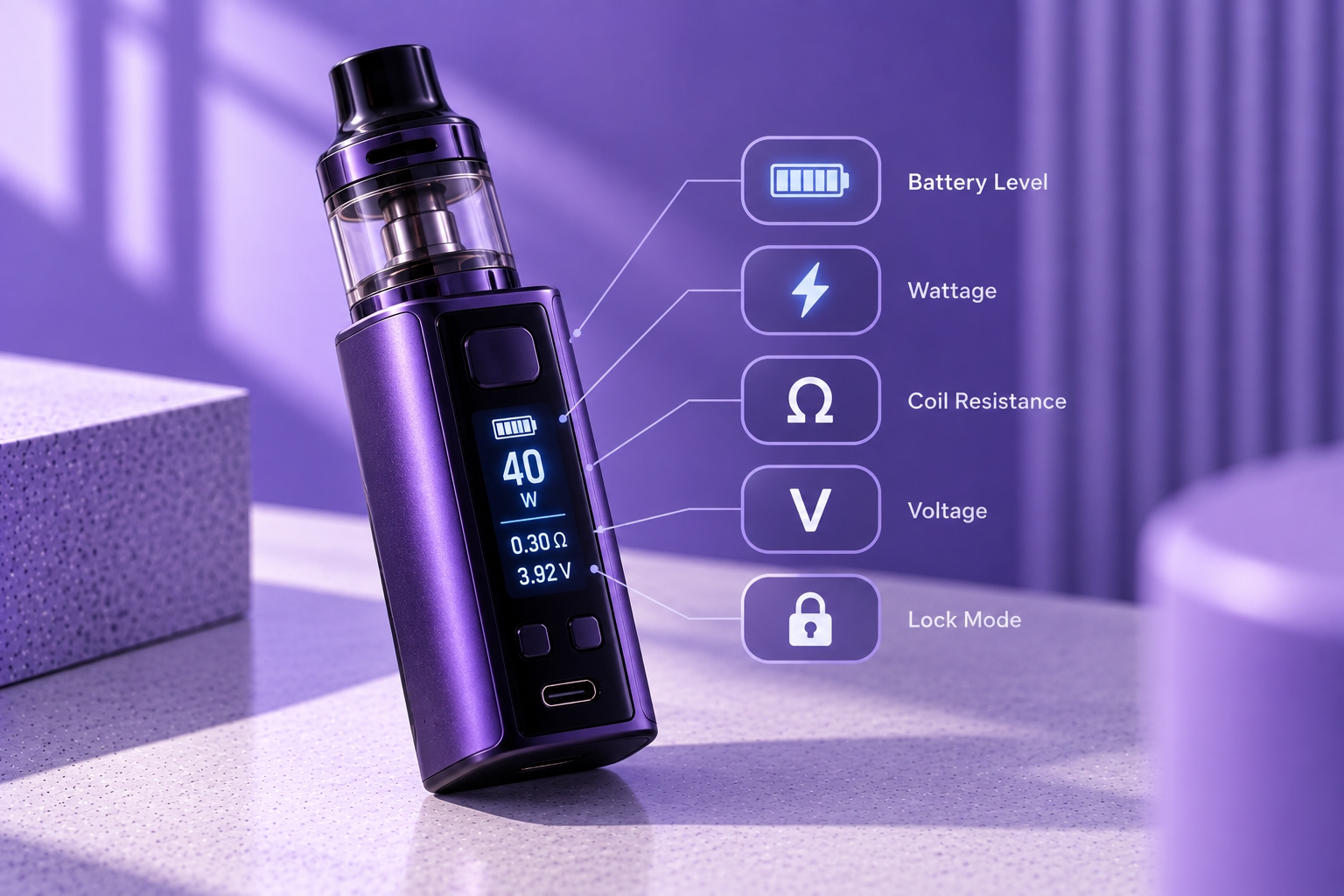
Note: Vape screen symbols and warning messages vary by manufacturer, chipset, and model. The explanations below are general references, not a universal diagnostic chart. Confirm unfamiliar indicators in your device's official manual.
Not sure what a symbol on your vape screen means? Depending on the device, the display may show a battery icon, padlock, coil reading, operating mode, or warning such as CHECK ATOMIZER, SHORT, or LOW BATTERY.
Some indicators simply describe the device's current status. Others may signal a condition that requires attention. Understanding the difference helps you recognize normal screen information without overlooking important warnings.
This guide explains common vape screen symbols, what different warning messages may indicate, and when to consult the manufacturer's instructions or stop using the device.
What Do the Symbols on a Vape Screen Mean?
Vape screen symbols are visual indicators used to communicate information about battery status, controls, operating settings, and device protection. They may appear as icons, abbreviations, numbers, or written messages.
There is no single standardized screen layout. Even when two devices display the same symbol, their operating behavior may differ. The exact model and its documentation determine the intended meaning.
Common Vape Screen Icons and Their Meanings
Battery Icon
A battery-shaped icon usually represents estimated remaining battery charge. Some devices display bars or a percentage, while others show separate battery indicators or charging animations.
The display is an estimate rather than an exact prediction of remaining runtime. A battery icon that changes during charging may reflect normal behavior, depending on the device.
Lock or Padlock Symbol
A padlock icon or LOCKED message generally indicates that certain device controls have been restricted. Depending on the model, this may affect adjustment buttons, firing, or other functions.
Use the manufacturer's instructions to identify the correct unlocking procedure. Do not assume the same button combination works across different models.
Wattage, Voltage, and Resistance Symbols
The letters W and V generally refer to electrical power and voltage, while Ω represents resistance measured in ohms.
These are normally operating readings rather than warning symbols. On adjustable devices, follow the installed coil's recommended operating range and the manufacturer's specifications. Puffin's vape wattage article provides additional context about power settings.
Puff Counter and Timer
A PUFF label or similar counter generally records activations recognized by the device. A timer may show how long an individual activation lasted.
These values should not be interpreted as exact measurements of e-liquid consumption, nicotine intake, or remaining device lifespan.
Operating Mode Symbols
Some screens display abbreviations such as VW, TC, SMART, BYPASS, or other manufacturer-specific mode labels.
These indicate the selected operating mode, but their functions vary by device. Check the manual before changing an unfamiliar setting.
Common Vape Screen Warning Messages Explained
Unlike ordinary status icons, warning messages may indicate that the device has detected a condition affecting normal operation. The examples below describe common interpretations, but the exact cause must be confirmed for the specific model.
What Does CHECK ATOMIZER or NO ATOMIZER Mean?
These messages generally indicate that the device is not detecting the expected atomizer or coil connection correctly. Possible explanations depend on the device and may involve an improperly seated component, connection problem, or incompatible hardware.
The diagnostic steps are covered separately in Puffin's No Atomizer troubleshooting article.
What Does SHORT or ATOMIZER SHORT Mean?
A SHORT or ATOMIZER SHORT message generally indicates that the device has detected an electrical condition associated with short-circuit protection.
Do not repeatedly attempt to activate the device or bypass its protection system. Stop using it until the condition has been identified using the manufacturer's instructions. Puffin's Atomizer Short article addresses this warning in more detail.
What Does LOW BATTERY Mean?
LOW BATTERY generally indicates that the device's control system has detected a battery condition requiring charging or limiting normal operation.
A low-battery warning does not automatically mean the battery is defective. Follow the device's charging instructions and discontinue use if there are signs of damage or abnormal heat.
What Does OVER TIME or TIME OUT Mean?
Some devices display OVER TIME or TIME OUT when an activation reaches the maximum firing duration programmed by the manufacturer.
This can be a normal protection response rather than a malfunction. The timing varies by model. Puffin's firing cutoff article explains how activation limits differ from unexpected power interruptions.
What Does OVER HEAT or TOO HOT Mean?
A temperature-related warning may appear when the device detects conditions outside its permitted operating limits.
If the device displays an overheating warning or becomes unusually hot, stop using and charging it. Do not repeatedly activate it to test whether the warning disappears.
What Does NEW COIL or NEW ATOMIZER Mean?
Some regulated devices ask whether a new coil or atomizer has been installed after detecting a connection or resistance change.
This may be a normal confirmation prompt rather than an error. Follow the device's instructions before selecting an option.
Quick Reference: Vape Screen Symbols and Warnings
| Screen Indicator | General Meaning | What to Check |
|---|---|---|
| Battery icon | Estimated charge | Battery status instructions |
| Padlock | Control lock | Lock and unlock procedure |
| W / V / Ω | Electrical readings | Device and coil specifications |
| PUFF / timer | Activation count or duration | Counter and timer functions |
| NO ATOMIZER | Atomizer detection warning | Connection and compatibility |
| ATOMIZER SHORT | Electrical protection warning | Stop use; follow manual |
| LOW BATTERY | Battery status warning | Charging instructions |
| OVER TIME | Activation time limit | Firing cutoff specification |
| OVER HEAT | Temperature warning | Stop use; follow manual |
What Should You Do When a Symbol Is Unfamiliar?
Identify the exact device model and compare the symbol or message with its official manual. Note whether the indicator appears during charging, activation, or normal standby operation.
If the message indicates a protection event, avoid repeatedly activating the device. For charging-related concerns, Puffin's charging problem article covers a separate troubleshooting process.
Screen Symbols vs. LED Indicator Lights
A screen can display written messages, icons, and numerical readings. Devices without full displays may communicate status through colored or blinking LEDs instead.
Because light patterns also vary by model, Puffin's LED indicators article covers those signals separately.
Final Thoughts
Vape screen symbols can communicate ordinary operating information or important protection warnings. Battery icons, lock symbols, and electrical readings are generally informational, while messages such as ATOMIZER SHORT or OVER HEAT may require immediate attention.
Use the manufacturer's manual to confirm unfamiliar indicators, and stop using the device when a warning suggests an electrical or battery hazard.
Sources & Further Reading
- Vaporesso — GEN 200 / GEN 80 S User Manual
- Vaporesso — XROS 4 Nano User Manual
- Vaporesso — Device FAQ and Troubleshooting
- U.S. FDA — Vape Battery Safety
Safety reminder: Do not bypass device protection features or continue using equipment that displays a persistent electrical fault, becomes unusually hot, or shows signs of battery damage. Follow the manufacturer's instructions for the exact model.