 United States

Why Is There Moisture Inside My Vape Screen? Condensation and Warning Signs
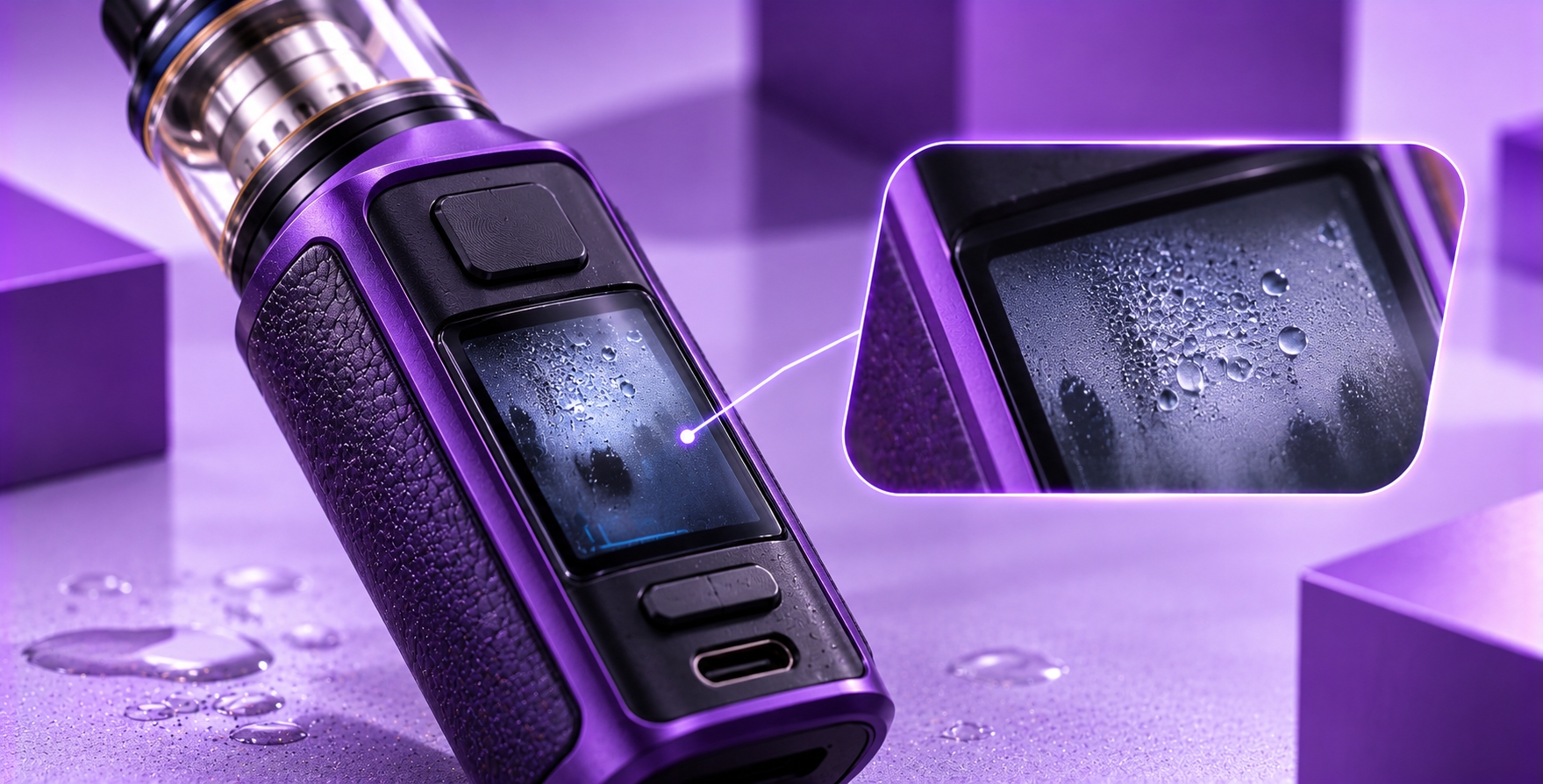
Noticing fog, cloudy patches, or tiny droplets beneath your vape screen can be concerning, especially when the display was previously clear. Moisture that appears to be inside the screen is different from fingerprints or condensation on the outside surface. It may indicate humidity trapped beneath the display cover or liquid entering an area that is not intended to become wet.
A vape screen contains electronic display components, and the surrounding housing may also contain circuit boards, wiring, and battery-related electronics. The level of protection against moisture varies significantly between devices. Some models are designed with specific water-resistance features, while others have no published protection rating.
This guide explains possible causes of moisture inside a vape screen, how to distinguish surface fogging from suspected internal condensation, and which non-invasive checks are appropriate before seeking manufacturer support.
Quick Verdict: Moisture inside a vape screen may result from temperature-related condensation, exposure to humid conditions, liquid entering through damaged seals, or an existing housing defect. A cloudy display does not prove that the battery or circuit board is wet, but visible moisture beneath the screen should be treated as possible liquid intrusion. Stop using and charging the device, avoid attempting to heat or open it, and consult the manufacturer's guidance.
Can Condensation Form Inside a Vape Screen?
Condensation occurs when water vapor encounters a surface that is cool enough for moisture to form. If humid air enters a device housing, changing temperatures can potentially cause moisture to collect on internal surfaces, including a display cover.
For example, moving a device from a cold environment into warm, humid air may create condensation on exposed surfaces. Whether moisture can also form beneath the screen depends on the device's construction, sealing, and the amount of humid air or liquid present inside the housing.
However, a foggy appearance is not enough to confirm condensation. Screen delamination, damaged display layers, scratches, and other defects may sometimes produce a cloudy appearance. Without examining the device, these possibilities cannot always be distinguished visually.
What Causes Moisture Inside a Vape Display?
1. Sudden Temperature Changes
A rapid change from a cooler environment to warmer, humid surroundings can create conditions favorable to condensation. This is especially relevant if humid air has entered an enclosure that is not fully sealed.
A screen that appears cloudy shortly after an environmental change may be affected by condensation, but the location of the moisture still matters. Water on the outside of the screen is not the same as droplets trapped beneath the cover.
2. Exposure to Rain or High Humidity
Rain, splashes, and prolonged exposure to damp conditions can allow water to reach openings or seams, depending on the device design. Buttons, charging ports, display edges, and other housing interfaces may provide potential entry paths when protection is inadequate or damaged.
High humidity alone does not establish that a device has suffered liquid damage. The concern becomes greater when moisture is visibly trapped beneath the screen or other signs of malfunction appear.
3. E-Liquid Entering the Device Housing
A leaking tank or pod may allow e-liquid to collect around the device's connection area. Depending on the construction and location of the leak, liquid may reach areas containing electronics.
E-liquid is not the same as water condensation. A sticky film, staining, or residue may suggest contamination, but appearance alone cannot reliably identify which liquid is present.
For related external moisture issues, Puffin's pod connection troubleshooting guide explains how condensation or leaked liquid around accessible electrical contacts can interfere with normal operation.
4. Damaged Housing or Display Seals
A cracked screen cover, damaged housing seam, or compromised seal may reduce the device's protection against environmental moisture. A device that has been dropped or physically damaged deserves particular attention.
Even devices advertised with water-resistance features may have limitations. Protection ratings apply under specified test conditions and should not be interpreted as a guarantee against every type of liquid exposure or damage.
5. Existing Display Damage That Resembles Moisture
Cloudy patches do not always come from liquid. Damage to a display cover or internal display layers may create an appearance that resembles fogging.
If the screen looks cloudy but no droplets are visible, the cause may be difficult to identify without qualified inspection. Avoid pressing on the display or opening the housing to investigate.
Surface Condensation vs. Moisture Beneath the Screen
The first distinction is whether the moisture is on an accessible exterior surface or appears trapped behind the display cover. That difference changes the appropriate response.
| Observation | Possible Explanation | Recommended Action |
|---|---|---|
| Fog on the outer screen surface | External condensation | Keep device off and inspect for other moisture |
| Droplets appear beneath the display cover | Suspected internal liquid intrusion | Stop using and charging; contact support |
| Cloudy patch does not change when exterior is wiped | Possible internal moisture or display damage | Seek manufacturer assessment |
| Screen fogging with flickering or unexpected shutdowns | Possible electrical or display fault | Discontinue use immediately |
| Moisture with unusual heat, odor, or swelling | Potential serious battery or electrical hazard | Do not use or charge; follow emergency safety guidance |
These observations are general indicators, not a substitute for a manufacturer inspection. A screen that becomes clear again does not prove that the internal electronics are dry or undamaged.
What Should You Do if Moisture Appears Inside Your Vape Screen?
Step 1: Stop Using and Charging the Device
If moisture appears trapped beneath the display, stop operating the device. Disconnect it from charging equipment if it is safe to do so, and switch it off using the normal controls if available.
Do not repeatedly activate the device to check whether the display still works. A functioning screen does not rule out internal moisture or electrical damage.
Step 2: Check for Immediate Safety Warning Signs
Look for unusual heat, swelling, smoke, abnormal odors, damaged housing, or unexpected activation. If any of these are present, do not continue troubleshooting. Keep clear of the device and follow appropriate battery-fire safety guidance.
Step 3: Inspect Only Accessible Exterior Surfaces
Without opening the device, observe whether the moisture is on the exterior screen surface or appears behind it. If permitted by the manufacturer, gently wipe the exterior with a clean, dry, lint-free cloth.
Do not insert cloth, swabs, or tools into the display seam, charging port, or internal openings.
Step 4: Record the Conditions
Note whether the issue appeared after rain exposure, a drop, a leaking pod, or a significant temperature change. A photograph of the display and the exact device model can help manufacturer support assess the situation.
Step 5: Contact Manufacturer Support
If moisture appears inside the display, seek model-specific instructions before using or charging the device again. The manufacturer can advise whether inspection, authorized service, or replacement is appropriate.
Safety Warning: Do not use a hair dryer, heat gun, oven, direct sunlight, or other heating method to remove moisture from a vape. Do not place the device in rice, open a sealed battery housing, or reconnect it to power simply because the screen appears dry. If liquid intrusion is suspected, seek manufacturer guidance before further use.
Can Moisture Inside a Vape Screen Damage the Electronics?
Potentially. If water or e-liquid reaches electronic components, it may interfere with electrical connections, contribute to corrosion, or cause abnormal operation. The actual outcome depends on the liquid, exposure, circuit design, and protective features of the device.
Moisture beneath the display does not establish that the battery has been exposed. However, the location and extent of any internal liquid intrusion are usually not visible from the outside.
This uncertainty is why a device with suspected internal moisture should not be repeatedly charged or activated to see whether it has recovered.
Does a Foggy Vape Screen Mean the Battery Is Damaged?
Not necessarily. A foggy display may be limited to the display enclosure or may represent a different cosmetic defect. It does not, by itself, confirm battery damage.
Nevertheless, moisture inside a battery-powered device deserves attention because the internal condition cannot always be determined through external inspection.
If the device also shows unexpected shutdowns, inconsistent battery indications, or other electrical behavior, those symptoms require separate assessment. Puffin's battery percentage guide explains why changing charge estimates do not always indicate the same underlying problem.
What if the Vape Screen Still Works Normally?
A working screen is not proof that a device is safe after suspected liquid intrusion. The display may continue operating even if moisture has reached another part of the enclosure.
Some electrical faults may appear intermittently, and corrosion-related problems may develop after the original exposure. The absence of an immediate warning therefore does not establish that the device is undamaged.
If an unfamiliar error message appears, Puffin's screen symbols guide can help identify the type of warning, but it should not be used to justify continued operation when internal moisture is suspected.
Can You Dry Moisture Inside a Vape Screen Yourself?
There is no universal home-drying procedure that can verify the safety of every vape device after internal moisture exposure. A display becoming clear does not prove that moisture has been removed from connectors, circuit boards, or other internal areas.
Avoid applying external heat or attempting to remove the screen cover. If the manufacturer provides a specific procedure for the exact model, follow that guidance. Otherwise, seek authorized inspection or replacement advice.
When Should the Device Be Replaced?
Replacement may be necessary when the manufacturer identifies the device as non-serviceable, internal liquid damage is confirmed, or the display and electrical systems cannot be restored through approved service.
The following conditions warrant particular caution:
- Visible droplets or liquid trapped beneath the display.
- Screen fogging after significant water exposure.
- Unexpected firing, shutdowns, or electrical warnings.
- Corrosion or visible damage around accessible connectors.
- Unusual heat, swelling, smoke, or abnormal odors.
- Recurring moisture after previous manufacturer-approved service.
Do not dispose of a lithium-ion device in ordinary household trash. Follow local battery and electronic-waste disposal requirements and the manufacturer's instructions.
How to Reduce the Risk of Moisture Entering a Vape Screen
Although no handling method guarantees complete protection, the following precautions can help reduce unnecessary exposure:
- Keep the device away from rain, splashes, and wet surfaces.
- Avoid leaving it in damp bags, pockets, or storage areas.
- Protect it from drops that could damage housing seams.
- Address leaking pods or tanks promptly.
- Follow the manufacturer's specified environmental and storage limits.
- Do not assume that water resistance means waterproof operation.
- Stop using the device when suspected internal moisture appears.
Frequently Asked Questions
Why is my vape screen foggy on the inside?
Possible explanations include internal condensation, liquid intrusion, or a display defect that resembles moisture. If fogging appears beneath the screen cover, stop using and charging the device until the manufacturer provides guidance.
Can humidity cause condensation inside a vape?
Humidity can contribute to condensation when moist air encounters cooler surfaces. Whether that happens inside a particular vape depends on its enclosure, sealing, and exposure conditions.
Will moisture inside my vape screen disappear on its own?
Visible fogging may change as environmental conditions change, but its disappearance does not confirm that internal components are dry or safe. Do not use the appearance of a clear screen as a safety test.
Can I use a hair dryer to remove vape screen condensation?
No. Applying heat to a lithium-ion battery-powered device can introduce additional hazards and may damage the screen, housing, or battery. Follow manufacturer guidance instead.
Is a vape waterproof if it has an IP rating?
Not necessarily. An IP rating describes specified protection against dust or water under defined test conditions. It does not guarantee protection against all liquids, impacts, aging, or misuse. Check the exact model's published rating and limitations.
Should I charge a vape after water gets inside the screen?
No. If internal moisture or liquid intrusion is suspected, do not charge the device until the manufacturer or an authorized service provider has determined the appropriate next step.
Final Verdict
Moisture inside a vape screen may be related to condensation, water exposure, leaking e-liquid, or damage to the device housing. A cloudy display can also have non-liquid causes, so the appearance alone does not establish exactly what happened.
The important distinction is whether the moisture is on the outside surface or appears trapped beneath the screen. Suspected internal moisture should be treated cautiously because the condition of the surrounding electronics cannot be confirmed through visual inspection alone.
Stop using and charging the device, avoid improvised drying methods, and consult the manufacturer for model-specific inspection, servicing, or replacement guidance.
Bottom Line: A foggy screen does not automatically mean the battery has failed, but visible moisture beneath the display is not something to ignore. A screen that clears up is not proof that the device is safe to use again.
Technical References & Editorial Review
This article applies general condensation principles and lithium-ion device safety guidance to the visible symptom of moisture beneath a vape display. It does not claim hands-on testing of a specific device or that any particular internal component has been damaged. Model-specific documentation and qualified inspection take precedence.
- U.S. Food and Drug Administration — Tips to Help Avoid Vape Battery Fires or Explosions: battery handling, charging, and manufacturer safety instructions.
- U.S. Fire Administration — Battery Fire Safety: general lithium-ion battery warning signs and safe handling.
- International Electrotechnical Commission — IP Ratings: explanation of protection classifications for equipment enclosures.
Editorial Note: Prepared for adults of legal purchasing age. This guide distinguishes surface condensation, suspected internal liquid intrusion, and possible display defects. It prioritizes non-invasive inspection and does not recommend opening sealed electronics, applying heat, or charging a device with suspected internal moisture. Manufacturer instructions for the exact model should always take precedence.